
Last Modified: November 13, 2008, at 08:15 AM
Mac OS X Tiger 10.4+ required, Leopard 10.5 compatible since version 2.2

OSCulator 2.6.5

Download OSCulator 2.6.5

  • Changes:
    • Under Mac OS X 10.4:
      • fixed a crash condition when a document is closed while OSC data is received
      • found a workaround for a crash condition related to a system bug in user interface.
      • fixed a bug where some documents could not be opened.
      • fixed a bug where some actions could not be deleted.
  • Known Problems:
    • If a Wimote Vibrate event is used in a duplicated message, a crash will occur when closing the document.
    • Some Wii-Fit balance boards are unfortunately not working properly (YMMV, a model bought in september was working perfectly).

OSCulator 2.6.4

  • Changes:
    • Corrected a bug where the "OSCulator Out" virtual MIDI port would not show before a MIDI message is sent.
    • Optimized Wiimote settings by enabling or disabling hardware sensors. This has the consequence of saving a bit precious battery time.
  • Known Problems:
    • We still have problems with Mac OS X 10.4 when closing documents. When the document is running, there is no problem. I really apologize for this inconvenience, and will find a solution as fast as possible.

OSCulator 2.6.3

  • Changes:
    • Guitar Hero Wiimote extension is now working as expected.
    • Fixed a crash condition under Mac OS X 10.4.
    • Fixed Raw IR method that could cause a crash under rare conditions.

OSCulator 2.6.2

  • New Features:
    • Wii Balance Board initial support (press the RED sync button in the battery compartment).
    • TUIO protocol interpretation for better ease of use with OSCulator.
    • MRMR protocol specific support.
  • Changes:
    • optimized line deletion in Main window when a lot of osc messages are present.
    • fixed a potential crash or memory leak under Mac OS X 10.4.
    • fixed the display of the Wiimote slot ID menu in the Wiimote drawer for English, Italian and Spanish languages.
  • Known problems:
    • There is a potential crash condition when the Raw IR is activated and that the software is unregistered.
    • Under Mac OS X 10.4, OSCulator could crash unexpectedly while updating "activity lights" status.

OSCulator 2.6.1

  • Changes:
    • fixed a bug where users of Mac OS X Tiger could crash when another application is launched.
    • fixed the menu behaviour in the Value column of the main window
    • fixed a potential error when launching the SpaceNavigator and prevented this operation on system that don't have the drivers installed.
    • fixed a menu problem in the OSC route editor
    • corrected some minor localization issues
    • fixed some windows so they remember their last positions as expected
    • fixed a bug in MIDI pitch bend emulation
    • fixed a bug in Note Params values updating
  • Known problems:
    • When opening an document created with OSCulator version 2.5.6 and containing OSC routings, the routing is not done as expected.
      To workaround this problem, recreate the routing in the OSC Hosts tab pane of the Parameters window.

OSCulator 2.6

This is the latest version compatible with Mac OS X Tiger 10.4.11.
OSCulator 2.7 will be Leopard only (I'm opened to listen to desperate 10.4 users though, please make a suggestion!)

  • New Features:
    • French, Italian and Spanish translations
    • added the possibility to generate a single MIDI note
    • added a simple event logger system (use Console.app to see results)
    • preset management system (also preset changing from osc, and wiimote led follows preset #)
    • OSC routing editor: forge custom messages or change incoming OSC messages with a graphical editor
    • added support for two virtual HID joysticks
    • input lock: avoid to make any changes to the document when the lock is on
    • added preliminary support for the TUIO protocol
    • rewrote event triggering system
    • start and stop Wiimote discovery using OSC messages (send /osculator/discovery/start and /osculator/discovery/stop)
    • wii guitar hero controller preliminary support
    • added the ability to edit multiple lines at once
    • added the ability to "split" an input in two (from 0 to 0.5 and 0.5 to 1) in order to get two events from that range from 0 to 1. for example, you can use it with a joystick and assign an event for both directions of an axis.
    • added the ability to "demux" a message based on the value of an argument (useful for TUIO protocol and Iannix software)
  • Changes:
    • upgraded max count of connected Wiimotes to 8
    • added smoothing to Raw IR
    • added double and triple clicks to mouse events
    • simplified keyboard combo creation (now you just have to strike the combo)
    • fixed crashing when receiving TUIO protocol messages
    • corrected a problem with MIDI aftertouch when producing notes
    • corrected a problem with MIDI notes repeating even if option is not set
    • added the possibility to generate polyphonic MIDI notes from a single OSC address space based on an Index
    • corrected some bugs in mouse output
    • corrected a bug in wiimotes slot change
    • enhanced Kyma/Capybara driver
    • updated Sparkle to version 1.5
    • optimized performance
  • Known problems:
    • Under Mac OS X Tiger (10.4), OSCulator could crash due to a problem in memory deallocation. This problem is under investigation.

OSCulator 2.5.6

  • Changes:
    • fixed a bug dealing with Nunchuk buttons.

OSCulator 2.5.5

  • New Features:
    • new Event Type : Wiimote Enable. Allows the user to enable or disable based on the value of another OSC input.
  • Changes:
    • fixed OSC pattern matching in Liblo
    • forbid OSC messages recording with characters like " #*,?[]{}"
    • rewrote Bonjour support
    • fixed a crash when computer is awaken from sleep
    • updated Event Type Note On/Off triggering to be more compatible with OSC devices
    • fixed a bug when connecting a Wiimote extention that would not be properly recognized in time
    • enhanced Wiimote button triggering
    • enhanced Wiimote driver to avoid sending empty button messages when extension is connected

OSCulator 2.5.4

  • New Features:
    • In the Parameters Window, it is now possible to assign a specific application target for each defined key combo
  • Changes:
    • fixed an 'OSC Forward' bug when used from a existing document
    • fixed some memory leaks
    • corrected event firing
    • changed key modifiers printing order based on Apple's standards
    • enhanced OSC compatibility
    • optimized activity flashing
    • corrected a bug in the Crash Reporter where logs could not be displayed
    • dropped support for reading old file format (version 1.4)

OSCulator 2.5.3

  • New Features:
    • Wiimote Vibration
  • Changes:
    • tweaked MIDI Note On/Off code to be more compliant with other software like Live 7
    • fixed a potential crash in toolbar initialization
    • fixed a potential crash in Bonjour OSC discovery code that could crash the application

OSCulator 2.5.2

  • Changes:
    • Corrected an awful bug that prevented users without a bluetooth adapter to use the application.

OSCulator 2.5.1

  • New Features:
    • Perfect Pairing technology enables Wiimotes to reliably connect to OSCulator
  • Changes:
    • Corrected a bug that prevented CrashReporter to actually report a crash log.
    • Changed MIDI Note On/Off and MIDI CC Toggle so they can be triggered from a continuous controller (Wiimote accel parameter for example)

OSCulator 2.5

  • New Features:
    • Raw IR Data from Wiimote
    • Parameters Window
    • Key Combos
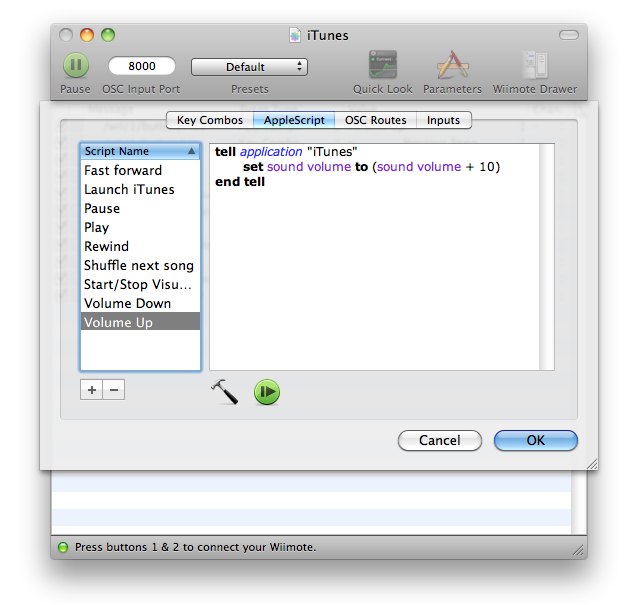
    • AppleScript
    • OSC Forward, OSC Hosts and Bonjour
    • MIDI or Kyma Notes
    • MIDI Control Change Toggle
    • Duplicate Function
    • Mouse support
    • Meta Events
    • OSC Argument can be named by double clicking in the Address column
    • New device supported: SpaceNavigator
    • Automatic Software Updates (Sparkle Framework)
  • Changes:
    • Activity light is now green when the message has been successfully handled, yellow if nothing happened, and red if an error occured
    • The Help menu now brings you to the online documentation
    • The search field has been removed
    • The "Event" column has been renamed "Value" and "Type" column has been renamed "Event"
    • The window position and columns size are now saved in the document and restored when the document is opened
    • OSCulator now sports a standard, user customizable toolbar
    • The Wiimote settings can be now reset by clicking a new button named "Reset settings" in the Wiimote drawer.
    • A keyboard shortcut has been assigned to toggle the display of the Wiimote drawer.
    • The behaviour of the application when the user clicks the Dock icon has been changed to something more standard
    • A small crash reporter has been bundled with OSCulator, which will hopefully help improve the code quality.
    • OSCulator can download and install new updates, thanks to the Sparkle framework.
    • The solo, enable, disable routings function behaviour has been changed to something more consistent.
    • Keycode Events have now their symbol displayed in the list
    • Kyma driver has been updated with a new method of device discovery leading to future improvements like the support of multiple Capybara at the same time.

OSCulator 2.2

  • New Features
    • OSCulator is now tested under Leopard and works well.
  • Changes:
    • Scheduling of the Kyma driver has been enhanced and uses less CPU resources.
    • A cosmetic bug where two labels were overlapping has been fixed when starting the Wiimote discovery while another Wiimote was already connected.

OSCulator 2.1.1

  • Changes:
    • The Wii logo would not show when a Wiimote is actually connected. Fixed.

OSCulator 2.1

  • New Features:
    • Up to four Wiimotes can be connected
  • Changes:
    • A crash happening when the Wiimote was disconnected has been corrected
    • Prevented a situation where Kyma could crash while initializing

OSCulator 2.0

Version notes:

  • New Features:
    • Wiimote support!!!
    • MIDI Control Changes!!!
    • Actions toggle enable/disable/solo
    • Possibility to put the main window on top, like a floating tool
  • Changes:
    • Keycode Helper now shows a menu with a list of all opened applications. When an application is selected, Keystrokes are sent to that application only, even if it is hidden.
    • Range column is no longer displayed
    • Range calibration is no longer possible
    • Preferences have been reorganized
    • Activity monitoring (red lights) has been optimized
    • File format changed and results in files of smaller size. You can still open older files.
    • Kyma Related:
      • Now the Flame interface is automatically discovered, and is 'hot-pluggable'.
      • The 'Capybara' logo is only displayed when the is successfully connected.
      • The Flame driver has been greatly enhanced and is compatible with all firmwares.

Kyma Users are recommended to use Kyma X.44 and the 070317 AV/C firmware. You can stil use the older firmware (non AV/C) if you need compatibility with the Continuum.