

You are free to decide which amount you want to pay for purchasing OSCulator. It is not required to have a Paypal account to place an order, a credit card will be enough.
Recommended price is $39 USD, minimum amount is $19 USD, thanks!
For special inquiries (mass licensing, license named after someone else, gift, etc.), please contact Camille <camille@osculator.net>.
What do you get when you register?
No more tiresome nagging window
All updates for the current major version (version 2)
Quality support by email or on the forum, feature requests, etc.
What will happen after I have paid?
Minutes after the transaction is completed, you will automatically receive an email with a license file and instructions on how to install it on your computer.
However, email servers can be busy and you might want to wait up to half an hour before your receive your personal license. If anything goes wrong, I will personally take care of your issue.
Tips for placing your order
IMPORTANT: If you are going to use your Paypal account, please check that the email address is valid. In any case, check that the email address you use is valid.
IMPORTANT: Your mail application could fool the license email with some dirty spam. Don’t panic, and check your junk mail folder if you think you haven’t received the license.
Think about positive things and how satisfied by OSCulator you are!
Now, fill in the form below with the amount you wish to pay.
A software for making sound and vision with new controllers
OSCulator is a software that links your controllers to your music and video software. For example, with OSCulator, your Nintendo Wiimote or iPhone can talk to major MIDI sequencers or your favorite console emulator or even the Kyma sound design workstation.
OSCulator supports the OSC protocol which makes it able to be used with a wide variety of software and devices like SuperCollider, Processing, Max/MSP or the Lemur multitouch controller.
Please visit the features page for more informations.
I’m proud to announce the first release candidate of OSCulator 2.9!
So many changes have been done so far, I wanted to give this version a trial before releasing it through the automatic update process.
Social networking plug
I now have a Twitter account I will use for sharing updates and some news. If you download this release candidate, consider following me:
Highlights
Now, the main highlights of this release are :
Initial Wii Motion Plus support.
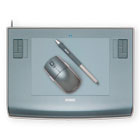
Wacom Tablet users can choose the key combo to use for mouse locking.
OSC router is now much more transparent as it now handles now not only numbers but also all types of data.
And also other cool new features like a new status bar saving some important real estate, a Notepad to take notes inside the application, and literally tons of bugs fixed. For the complete change log, and a download link, follow this link.
What’s in, what’s out
After talking with some non-native english speakers users, I decided to stop translating OSCulator in other languages. The first reason is how localization (translation), prevented me to make any change to the user interface. The second reason is the dependency on 2 or 3 friends that had to contact every time I was changing text. The last reason is more semantic: I believe that technical software in an identical field of application should be in the same language so all the terms are consistently the same across every programs. The language for multimedia technical parlance has always been English, so I’ll stick to that.
Mac OS X Tiger users should be aware that this major upgrade will be the last for Tiger systems. Back in version 2.7, I announced this was going the last for Tiger, but after many users reaction, I kept the 10.4 support going. For your information, supporting the Tiger platform means spending almost 40% of my working time only on testing and debugging those nasty bugs. Now, the decision is made: OSCulator 2.10 will be compatible with 10.5 Leopard and higher.
All this means that I can spend time on other features like the status bar which not only has a great look, but also reports useful info. I have been able to make lot of subtle changes to the user interface which was stuck since the day I decided to translate oscltr in 4 languages.
Now I’m free and it feels good.
Stay tuned
During the release candidate period I will post some articles about the Motion Plus, I guess this is the part which really needs some explanations. I will also talk about the OSC router, and other tips and tricks.
So, stay tuned. If you have any question, the forum is there to help. Thanks for reading.
Ronan sent me this amazing video where he plays retro games using the Wiimote and OSCulator :
While it’s fun to play games from archaeologic times, it’s also fun to have a merry hack party and invent the games of the future. The event will happen in Nuremberg on 6 to 8 november at the “Zentrifuge” Event Hall.
Here’s more information from the the makerjam website:
A weekend marked by fun, innovation and the joy of experimentation. Games developers, designers, artists, programmers, hardware wizards – beginners and professionals – form teams and develop computer games. A competition with the emphasis clearly on fun.
Whether you burn for ideation, concepts, sketching, artwork and design, game logic, hardware design, programming, character development, or audio – the Game Jam has room for every type of talent. The teams are free to choose their controller, programming language, and platform. Work with Flash, a game engine, or a PC game kit. Develop a game for mobile phones, for a PC or for a console – as long as you own the tools and can bring them along. Lash up your old joysticks to a monster control panel, program an iPhone as the central controller, build innovative interfaces with Arduino, or find newer, smarter ways to integrate mouse, keyboard and webcam in your game.
Tobi very kindly donated his time and passion to contribute a tutorial for German speaking users. It covers how to trigger clips and effects in Ableton Live with a Wiimote.
When I first heard of Silent Way — a plugin suite written by Os from Expert Sleepers — my first thought came to a song performed by Weather Report. The lead keyboardist, Joe Zawinul, was well known for his use of the ARP 2600. He used to have two of them, with one having the keys order inverted so he could play low and high notes together on both keyboards.
Silent Way is a suite of plug-ins designed for use as part of a modular analogue synthesiser system. The plug-ins produce no sound themselves, nor do they process sound – rather, they generate signals to be used as control voltages (CVs), which can be patched into the control inputs of oscillators, filters, VCAs etc. of an analogue system. Also, with the addition of the CV Input plug-in, it is possible to bring CVs from the synth into the computer, for recording or processing.
With this in mind the relationship to Weather Report’s song became even clearer in my mind. Joe Zawinul was a notable innovator, thus naming a plugin after a song he wrote for Miles Davis in 1969 was certainly appropriate. My interpretation has changed though, I understand the name reflects the fact that these plugins are just “silent”.
Using Analog Modular Synths is not always easy or convenient. First, you have to deal with calibration and fine tuning of the parameters. You have to consider that temperature can affect your settings, so playing them on stage is not really obvious. Also, there’s not a lot of solutions when it comes to using them along with modern setups involving a sequencer, plugins, MIDI or OSC.
Typically you would use a CV to MIDI converter, but then loose a lot of information because MIDI’s limited data range. With some tweaking you would be certainly able to play sequences with the CV/MIDI converter, but it is not straightforward as some careful calibration is still needed.
Nonetheless, even with these limitations, modular synths are still designed, produced and used. There are even pieces of music written exclusively for modular synths. So, what makes them so appealing when you know difficult they are to use?
According to some people, their organic and raw response still surpasses digital signal processing based systems. But it’s not only that: there is a lot of plugins and digital workstation that sound great.
Really, I think their power lies in the ability to tweak them, turn the buttons, patch some cords, do this all in “real”.
It’s like using an analog mixer desk, instead of mixing with the mouse in Pro-Tools. I like this analogy very much, because it gives a good understanding of how things are evolving today: we want analog mixers, but drive them with a digital audio workstation. We want software plugins, but also keep the possibility of using an old Roland Tape Echo device, guitar pedals, EMT reverbs, and use all of them together — with automations. (to some extent, it’s like shooting pictures on film, and scan them on a film scanner without even making prints)
Silent Way helps this analog and digital cohabitation go further thanks to its automatic calibration and tuning features. If you own a compatible audio interface, the CV/MIDI converter is not needed anymore, and the computer takes control of your modular synth, exposing its rich features to your digital audio workstation.
Silent Way works both ways, your computer can control a modular synth, and a modular synth can control your computer. On his blog, Navs talks about his setup involving a Moon Modular sequencer and Logic running a virtual instrument. In his post, he shows a beautiful sequence generated by the synth which is plugged into his audio interface, acting as a soft CV bridge thank to Silent Way, then into OSCulator to process the OSC messages, and finally into Logic where the virtual instrument is hosted.